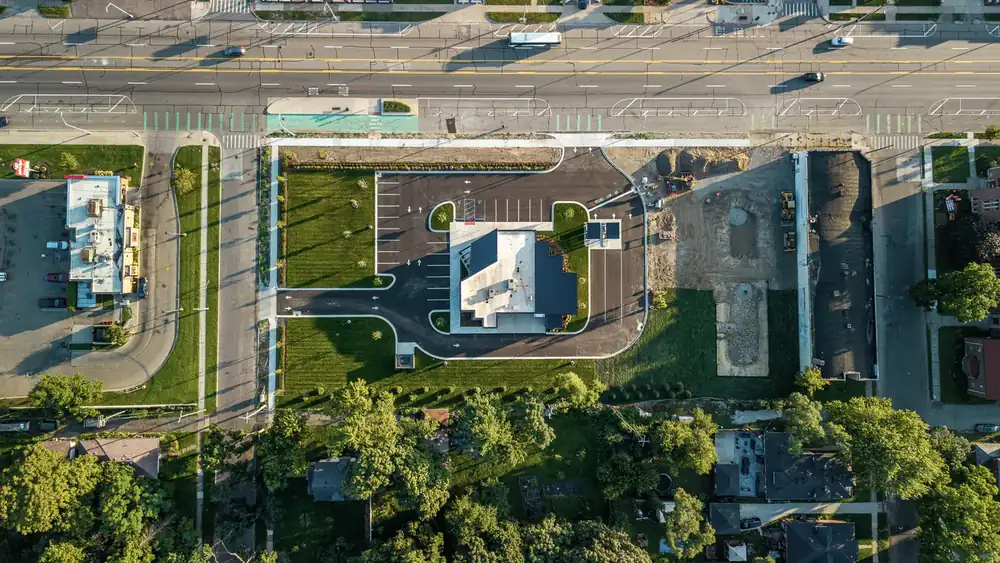
Monthly Construction Documentation for Commercial Jobsites
Monthly construction documentation gives active commercial jobsites one organized project record on a recurring cadence.
Synced Frames handles this through the Monthly Construction Documentation Package. Every scheduled visit includes ground photography, ground video, aerial photography where safe and legal, aerial video where safe and legal, milestone coverage, and organized delivery.
Use it when your team needs construction progress documentation, monthly jobsite documentation, or commercial construction documentation that can support owner updates, lender/draw context, OAC meetings, closeout records, RFP support, and long-term project archives.
Based in Frisco, Texas, Synced Frames serves DFW and Texas commercial project teams, with select nationwide deployment available for projects that need a consistent documentation system.
See What a Monthly Deliverable Looks Like
A monthly documentation package should make project progress easy to understand before anyone opens a full folder of individual files.
A typical deliverable may include dated folders, ground-level progress photos, drone site views, labeled project areas, milestone photos, and an optional one-page visual summary for owners, lenders, investors, or OAC meeting teams.
See a Sample Monthly Progress ReportWhat Is Monthly Construction Documentation?
Monthly construction documentation is a recurring visual record of a commercial jobsite.
Monthly construction documentation is the recurring version of the Synced Frames documentation package: ground photo and video, drone photo and video, and organized delivery captured on a set cadence.
It combines repeatable site visits, ground-level progress photos, drone construction documentation when allowed, milestone coverage when needed, and organized file delivery so project teams can see progress from month to month.
For a commercial team, the value is not photo volume. A folder with 900 loose images can still be useless.
The value is cadence. Same project, same reporting rhythm, similar key views, dated folders, and a record your team can use for owner updates, OAC meeting visuals, lender draw support, stakeholder reporting, closeout records, leasing, RFPs, and long-term project archives.
For one-off ground-level progress photos, see Construction Progress Photography. This page is for teams that need a recurring monthly record over time.
If the work is already built, turned over, newly opened, recently renovated, or ready for final marketing assets, use the Completion Documentation Pass.
Why Project Teams Use Monthly Documentation
Built for reporting rhythm, stakeholder visibility, and project memory
Most jobsites already have photos. The problem is where those photos end up.
One superintendent has 80 images on a phone. A project engineer uploaded 35 more to Procore. The owner's rep has screenshots from a March text thread. The marketing team has an old drone folder nobody renamed. By the time the next OAC meeting starts, the team is piecing together the record by hand.
Monthly construction documentation gives the project team a calmer system.
Use it when you need:
- Owner updates
- OAC meeting visuals
- Lender draw support
- Recurring construction documentation
- Monthly progress photos
- Commercial construction documentation
- Remote stakeholder visibility
- Same-angle progress tracking
- Drone views for aerial site context
- Milestone and pre-cover-up coverage
- Closeout records at the end of the project
- An organized project archive by month, area, and phase
- Portfolio, award, leasing, or RFP-ready visuals
The point is simple. Your team should not have to hunt through phones, text messages, Procore folders, SharePoint folders, Box links, and email chains just to explain what happened on site in April.
Who This Is For
Commercial project teams that need a reliable visual record
Monthly coverage is built for teams that need recurring visibility without adding another internal photo process.
It is a strong fit for:
- Developers and owners
- General contractors
- Owner's reps
- Architects and design teams
- Construction marketing teams
- Business development teams
- Industrial and commercial builders
- Multi-site project teams
- Franchise and rollout teams
- Executives who need clean progress visibility without daily jobsite noise
This is not a one-time "drone guy" visit. It is a documentation layer for active commercial projects where the record needs to be consistent, organized, and useful later.
What We Capture
Ground, aerial, milestone, and closeout-ready visuals
Each monthly visit is scoped around the project phase, site access, reporting deadline, safety requirements, and the questions your team needs the deliverable to answer.
Typical monthly construction documentation may include:
- Same-angle exterior progress photos
- Interior buildout progress
- Ground-level jobsite photography
- Drone aerial site context, when allowed
- Major milestone coverage
- Pre-cover-up documentation
- Site access, staging, and logistics views
- Facade, envelope, and exterior elevation progress
- Amenity, lobby, corridor, and interior finish progress
- Visible site conditions from the ground
- Final closeout and completion visuals
- Optional short monthly recap video
The goal is not to overshoot the site. The goal is to build a useful monthly record that shows progress clearly.
A 28-photo delivery that answers the owner's questions is better than a 300-photo folder nobody opens.
For projects that only need ground-level stills, Construction Progress Photography may be the right base service. For sites where scale, roof progress, logistics, or exterior context matter, Drone Construction Documentation can be included as part of monthly coverage.
For critical stages before work is covered, use Milestone & Pre-Cover-Up Documentation.
What You Get
Monthly deliverables organized for reporting, not storage
A monthly documentation package should be ready for the people who need to use it: owners, lenders, architects, executives, OAC teams, marketing teams, and project managers.
Depending on project scope, monthly coverage can include:
- 1 to 4 site visits per month
- 20 to 40 edited stills per visit
- Ground-level and aerial coverage
- Repeatable same-angle views
- Dated folders organized by visit
- Files organized by project area or scope category
- Optional one-page PDF progress summary
- Optional 30 to 60 second monthly recap video
- Closeout archive at project completion
- Delivery in 48 to 72 hours after each visit, depending on scope and project requirements
Files can be delivered in a structure your team can drop into Procore, SharePoint, Box, Google Drive, investor decks, draw packages, internal reports, or meeting agendas.
You get a record that is easy to send, easy to reference, and easy to find when somebody asks what the site looked like before drywall, before facade completion, or before the final turnover push.
See a Sample Monthly Progress ReportHow the Process Works
1. Scope the project
We confirm the project phase, location, site access rules, drone feasibility, safety requirements, reporting needs, and key stakeholders.
From there, we build a simple coverage plan around the views that matter most. For one DFW tenant improvement project, that may mean corridors, mechanical rooms, storefront progress, and finish details. For a multi-building industrial site in North Texas, it may include exterior elevations, logistics areas, roof progress, parking, utilities, and aerial context.
2. Set the monthly cadence
We establish the visit rhythm, reporting deadlines, preferred access windows, and any monthly meeting dates your team needs to support.
This matters. If the OAC meeting is on the second Tuesday, the documentation schedule should not drift into the third week of the month.
3. Capture the monthly record
We coordinate with the superintendent or project contact and document the site without slowing the job down.
Each visit is focused on repeatable views, visible progress, and project-specific reporting needs. If a lender package needs exterior progress, we prioritize that. If the owner needs interior buildout photos before a Wednesday update, we plan around that deadline.
4. Organize and deliver the files
Photos and optional video assets are edited, labeled, organized, and delivered in 48 to 72 hours, depending on scope and project requirements.
The result is a clean monthly record your team can use immediately for stakeholder updates, OAC meetings, payment support, executive reporting, project archives, or closeout.
Why Not Just Use Superintendent Phone Photos?
Phone photos are useful. They are not the whole record.
Your superintendent's photos still matter. Procore folders still matter. Internal documentation still matters.
Synced Frames does not replace those systems. We add the owner-ready documentation layer most projects are missing.
A superintendent is there to run the job. They are not always thinking about repeatable same-angle views, stakeholder presentation, lender draw support, closeout archives, marketing use, or whether the owner can understand the site from 200 miles away.
That is where recurring monthly documentation helps.
| Capability | Superintendent phone photos | Random drone operator | Construction camera | Synced Frames monthly documentation |
|---|---|---|---|---|
| Same angles every visit | Sometimes | Rarely | Fixed only | Yes |
| Ground and aerial documentation | Limited | Aerial only | No | Yes, when drone access is allowed |
| Owner-ready visuals | Inconsistent | Sometimes | Limited | Yes |
| Organized by date and project area | Inconsistent | Rarely | Limited | Yes |
| Useful for lender draw support | Sometimes | Limited | Limited | Yes |
| Pre-cover-up detail | Sometimes | No | No | Yes, when scoped |
| Closeout-ready archive | Rarely | Rarely | Limited | Yes |
| FAA Part 107 drone coverage | N/A | Sometimes | N/A | Yes, when aerial work is included |
The difference is not the camera. It is the cadence, shot planning, file organization, and reporting rhythm behind the record.
Common Use Cases
Monthly OAC meetings
Bring clean visuals into the room instead of relying on scattered updates, outdated site photos, or screenshots from last month's email chain.
Lender draw support
Show visible progress by date, area, and phase to support bank review, payment documentation, inspector follow-up, or draw conversations.
Owner and investor updates
Give stakeholders a clear month-by-month visual record without asking them to walk the site, chase the GC, or guess what changed since the last update.
Multi-site oversight
Keep documentation consistent across multiple commercial locations, franchise buildouts, regional rollouts, or active Texas projects running at the same time.
Long-duration builds
Create a month-by-month archive from early site work through closeout. That record can save time when somebody needs to review progress from January, March, October, or final turnover.
Closeout and portfolio records
End the project with an asset library that can support marketing, awards, leasing, proposals, future maintenance questions, and owner reference.
Scope and Pricing Guidance
Monthly construction documentation is scoped around the project phase, visit cadence, site access, stakeholder needs, and how the project record will be used.
The cleanest way to scope the work is to look at what your next scheduled documentation visit needs to capture, who needs the visuals, and where the record will be used after delivery.
Scope usually depends on:
- Current project phase
- Visit cadence
- Site size and access
- Ground and aerial documentation needs
- Milestone timing
- Owner, lender, OAC, or investor reporting needs
- Closeout, RFP, leasing, or portfolio use
- Delivery format and archive structure
Send the project phase, location, reporting deadline, and upcoming milestone. Synced Frames will map the next scheduled documentation visit around the Monthly Construction Documentation Package.
Send Your Project PhaseFAQ
How does the monthly retainer work?
We scope the project, set a monthly visit cadence, document the agreed areas, and deliver organized files after each visit. The cadence can be built around owner updates, OAC meetings, lender draw timing, or internal reporting needs.
Can this support lender draws?
Yes. Monthly documentation can provide dated visual support for lender draw conversations, bank reviews, payment documentation, and inspector follow-up. It does not replace formal inspection or legal documentation.
Can you include drone coverage every month?
Yes, when airspace, weather, site conditions, permissions, and FAA rules allow. Drone Construction Documentation is often useful for site scale, exterior progress, roof work, logistics, and surrounding context.
Do you work inside Procore or SharePoint?
We can organize files so your team can upload them into Procore, SharePoint, Box, Google Drive, or another project system. Workflow can be discussed during scoping.
Do you replace our team's jobsite photos?
No. Your team should still capture field photos for daily coordination, RFIs, issue tracking, and internal needs. Monthly documentation adds a cleaner stakeholder-ready record on a set cadence.
Do you only work in DFW?
DFW and North Texas are core service areas. Broader Texas markets and select national projects can be scoped when the project and schedule make sense.
Related Services
These pages explain the capture layers and use cases that can support the same recurring documentation package.
Ground-level progress photos and same-angle views captured as part of the project record.
View Service
Drone Construction DocumentationAerial context where safe and legal, paired with ground coverage so the record works from the site level and the air.
View Service
Milestone Construction CoveragePhase-specific documentation for work that may be covered, changed, or harder to explain later.
View Service
Construction Video WalkthroughsGround and aerial video context for stakeholder updates, OAC meetings, and monthly progress review.
View Service Hub
Start with the Monthly Construction Documentation Package. Then use these pages to clarify what the next visit needs to capture.
Ready to build a cleaner monthly project record?
See how a monthly progress report is organized before you scope the next visit.
Then send the current phase, location, access rules, reporting deadline, and upcoming milestone so Synced Frames can map what the next scheduled documentation visit should capture.