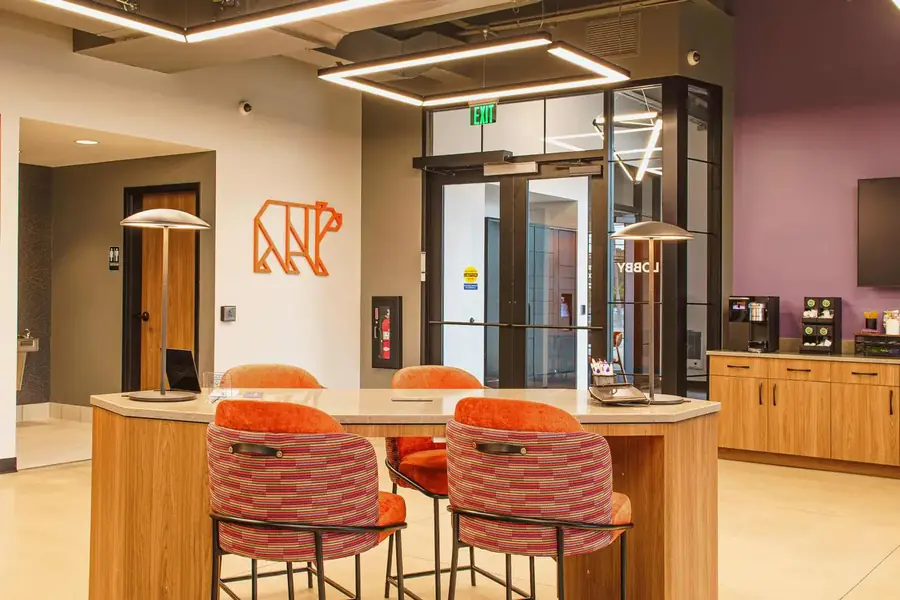
Construction Video Walkthroughs for Stakeholder Updates
Construction video walkthroughs help remote stakeholders understand jobsite progress faster.
Synced Frames captures walkthrough-style video as part of a scheduled documentation visit inside the Monthly Construction Documentation Package. Ground video, aerial video where safe and legal, progress photos, milestone coverage, and organized delivery work together so the walkthrough has context.
For finished or near-finished built work, walkthrough video can also support a Completion Documentation Pass when the space needs polished final assets for marketing, leasing, public launch, portfolio use, owner handoff, or stakeholder communication.
See What a Video Walkthrough Looks Like
A construction video walkthrough should make the site easier to understand in under 90 seconds.
-20.webp)
What Are Construction Video Walkthroughs?
Construction video walkthroughs are the ground-video walkthrough layer inside a construction documentation package, showing jobsite progress from the perspective of someone walking the project.
Construction video walkthroughs are the motion layer of the Synced Frames documentation package, paired with ground photography, drone photography, drone video, and organized delivery when the project needs more context than still images alone.
They can show interior progress, exterior changes, installed work, milestone areas, site conditions, access points, and key project zones in a format that is easier to understand than a folder of still photos.
For commercial teams, the value is speed. A 60 second walkthrough can help someone in Austin, Chicago, or New York understand the state of a Frisco jobsite without sorting through 40 photos or joining a 30 minute field call.
A strong walkthrough is planned, steady, edited, labeled, and exported for the places the team actually uses video: board decks, lender packages, owner updates, OAC meetings, investor reports, and project archives.
Why Project Teams Use Video Walkthroughs
Built for remote stakeholders who need the site to make sense fast
Photos are useful. Sometimes video explains the site better.
A still photo can show a corridor. A walkthrough can show how that corridor connects to the lobby, amenity area, elevator bank, storefront, warehouse bay, or exterior approach. That context matters when the viewer is not on site.
Use construction video walkthroughs when you need:
- Remote owner updates
- OAC meeting openers
- Investor report clips
- Milestone recap videos
- Board and lender packages
- Interior progress walkthroughs
- Exterior progress context
- Short recap videos for executives
- Jobsite visibility without a site visit
- Video add-ons for monthly construction documentation
The best walkthroughs are not long. They are clear. A 45 second video that answers the owner's question beats a 7 minute raw phone video nobody watches.
Who This Is For
Commercial teams that need a clearer update than photos alone
This service is built for project teams that need to show jobsite progress to people who cannot be there in person.
It is a strong fit for:
- Developers and owners
- General contractors
- Owner's reps
- Remote project managers
- Executives and board teams
- Lenders and investor groups
- Construction marketing teams
- Business development teams
- Industrial builders
- Multi-site commercial project teams
If the team only needs a quick internal reference, a superintendent phone video may be enough.
If the video will be shown to an owner, lender, board, investor, executive, or outside stakeholder, it should be planned, edited, and delivered with more care.
What We Capture
Planned routes, active progress, and short edited updates
Each walkthrough is scoped around the project phase, site access, safety requirements, reporting deadline, and the viewer questions the video needs to answer.
Typical construction video walkthrough coverage may include:
- Planned site walk route
- Interior progress walkthroughs
- Exterior progress context
- Installed work and area-specific progress
- Milestone recap footage
- Lobby, corridor, amenity, office, retail, warehouse, or industrial areas
- Optional drone clips when useful and allowed
- Optional voiceover or text captions when scoped
- 30 to 90 second edited progress videos
- Caption-ready exports for LinkedIn, email, decks, or internal platforms
- Organized raw selects on request
The goal is not to film the whole jobsite. The goal is to guide the viewer through the areas that matter.
For a 10,000-square-foot tenant improvement project in Plano, that may mean a 45 second interior walk. For a multi-building industrial project near Fort Worth, it may mean a 90 second sequence with exterior approach, drone context, dock areas, warehouse bays, and office progress.
What You Get
Video exports ready for decks, updates, and stakeholder review
Depending on scope, construction video walkthroughs can include:
- Planned site walk route
- 30 to 90 second edited progress video
- Optional drone clips
- Optional thumbnail image
- Caption-ready exports
- Horizontal video for decks and reports
- Vertical or square exports when scoped
- Organized final video folder
- Organized raw selects on request
- Optional integration with construction progress photography
- Optional add-on for drone construction documentation
Files are edited, labeled, and delivered in 48 to 72 hours unless the project needs a larger edit, voiceover, multi-site package, or custom turnaround.
That gives the project team a video update that can drop into a board deck, lender package, stakeholder email, project recap, or monthly report without someone editing clips late at night in iMovie.
See a Sample Monthly Progress ReportHow the Process Works
1. Scope the walkthrough
We confirm the project phase, access rules, safety requirements, reporting deadline, video length, drone feasibility, and the buyer questions your deliverable has to answer.
For a Frisco medical office project, the route may cover exterior approach, reception, corridors, exam rooms, and finish progress. For a Dallas office renovation, it may focus on lobby, elevators, tenant areas, conference spaces, and punch-list ready interiors.
2. Plan the route
We map the walk before filming so the video has a clear beginning, middle, and end.
That route matters. A walkthrough should feel like a guided site visit, not someone wandering through a jobsite with the camera running.
3. Capture the video
We coordinate with the superintendent or project contact and capture the planned route without slowing crews.
Footage is focused on the project areas the viewer needs to understand: installed work, visible progress, site context, milestone zones, exterior approach, interior sequence, or whatever the current reporting cycle requires.
4. Deliver the edit
Video files are edited, labeled, and delivered in 48 to 72 hours for most standard scopes.
Exports are prepared for the places your team actually uses them: board decks, lender packages, OAC meetings, PDF summaries, owner emails, internal recaps, and project records.
Why Not Just Send a Phone Video or FaceTime Walk?
Phone videos are useful for quick internal updates. FaceTime walks can solve a same-day question. Neither one automatically creates a clean stakeholder-ready record.
The problem is usually not the phone. It is the route, sound, pacing, framing, file quality, and delivery.
A raw 8 minute clip from a loud jobsite can be hard to watch. The viewer may not know where they are, what changed, or which part of the project they are seeing. And once that video gets buried in a text thread, it is not much of a record.
Synced Frames plans the walkthrough before filming and edits it for clarity.
| Superintendent Phone Video | FaceTime Walk | Polished Marketing Film | Synced Frames | |
|---|---|---|---|---|
| Planned route | Sometimes | Sometimes | Yes | Yes |
| 30 to 90 second stakeholder cut | Rarely | No | Sometimes | Yes |
| Clear progress context | Inconsistent | Inconsistent | Sometimes | Yes |
| Edited for decks and packages | No | No | Yes | Yes |
| Optional drone clips | No | No | Sometimes | Yes |
| Caption-ready exports | Rarely | No | Sometimes | Yes |
| Organized final folder | Rarely | No | Sometimes | Yes |
| Delivery in 48 to 72 hours | N/A | N/A | Varies | Yes, for standard scopes |
The difference is not that a phone cannot record video. The difference is whether the walkthrough was planned, edited, and delivered for the people who need to understand the jobsite.
Common Use Cases
Remote owner updates
Give owners and asset managers a clear view of the jobsite without asking them to fly to Dallas, Frisco, Fort Worth, or another Texas market.
OAC meeting openers
A short walkthrough can set context before the team gets into schedule, budget, RFIs, or critical path items.
Investor reports
Use a 30 to 90 second clip inside investor updates, quarterly reports, board materials, or project recap decks.
Milestone recaps
Show what changed around a major milestone, such as dry-in, lobby progress, MEP rough-in, exterior completion, tenant turnover, or pre-closeout.
Board and lender packages
Video can help lenders, board members, and executives understand the project faster than still photos alone.
Monthly documentation retainers
Construction video walkthroughs can be added to monthly construction documentation so each reporting cycle includes photos, aerials, and a short edited site update.
Scope and Pricing Guidance
Scoped per project based on route length, edit complexity, drone needs, and turnaround
Construction video walkthroughs are scoped around the job. They are not priced like a quick social media clip or a full commercial film.
Pricing depends on:
- Site location
- Route length
- Project phase
- Interior and exterior access
- Number of areas or floors
- Drone needs
- Edit complexity
- Captions or text callouts
- Horizontal, vertical, or square export needs
- Raw selects requests
- Turnaround time
- Whether video is one-time, monthly, or part of a larger retainer
No public dollar figures are listed because a 45 second walkthrough of a Frisco tenant improvement project and a 90 second update for a 250,000-square-foot industrial site do not need the same shoot plan or edit.
The cleaner way to scope it is to look at the route, audience, deadline, deliverables, and how the video will be used.
Send Your Project PhaseFAQ
How long are the videos?
Most construction video walkthroughs are 30 to 90 seconds. That length is usually enough for stakeholder updates, board decks, lender packages, and monthly progress recaps without turning the video into a long site tour.
Can you combine ground and drone footage?
Yes. Ground walkthrough footage can be combined with drone clips when aerial context helps explain site scale, exterior progress, roof work, logistics, or surrounding development.
Are these polished marketing videos?
They are edited for clarity, but they are not always full brand films. Most walkthroughs are practical progress updates built for owners, executives, lenders, OAC teams, and stakeholders who need to understand what changed.
Can video be included monthly?
Yes. Video walkthroughs can be included in a monthly documentation retainer, either as a standard monthly deliverable or as an add-on for specific milestones.
Can you add captions or labels?
Yes, when scoped. Captions, location labels, date cards, project area names, and short text callouts can make the video easier to use in decks, emails, and reports.
How fast are the files delivered?
Most standard walkthrough edits are delivered in 48 to 72 hours. Larger edits, multi-site packages, voiceover, or custom export sets may need a different delivery window.
Related Services
Aerial documentation with mapped, repeatable flight paths keeps each month's drone view easier to compare with the last. Use it for site context, roof progress, exterior work, and active commercial project records.
View service
Completion Photo + VideoWhen the project wraps, capture final imagery that holds up in award submissions, leasing decks, case studies, and the firm portfolio.
View service
Monthly Progress DocumentationYour owner, lender, and OAC team need consistent visual proof every month. We show up on schedule, hit the same angles every visit, and deliver organized photos, aerials, and optional walkthrough videos in 48 to 72 hours.
View service
Construction Progress PhotographySame-angle progress photos build a clean visual timeline of your project from groundbreaking to closeout.
View service
Need walkthrough context inside the project record?
If the project is active, send the phase. If the work is finished or near-finished, send the completion scope.