-20.webp)
Completion Photo and Video for Finished Built Work
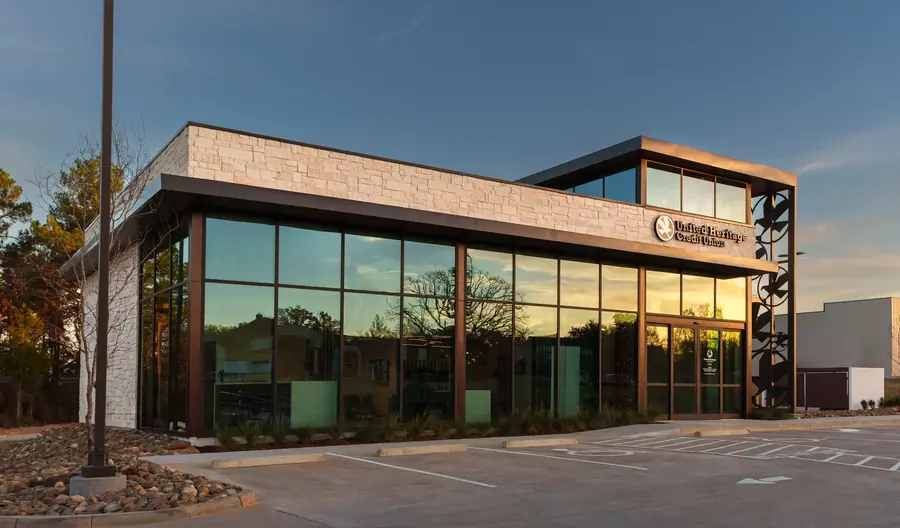
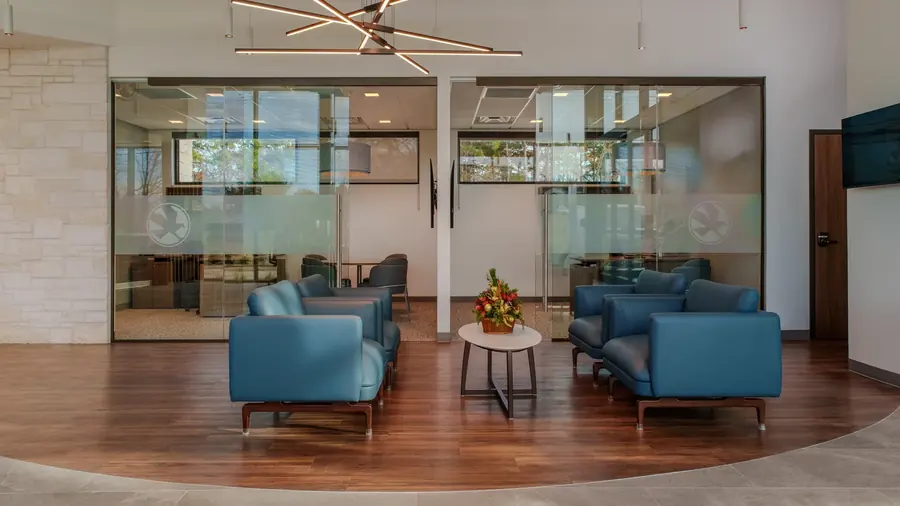
When the work is already built or near completion, Synced Frames can document the finished space in one focused Completion Documentation Pass.
This pass is for completed worksites, playgrounds, banks, commercial spaces, tenant buildouts, renovations, public-facing facilities, industrial spaces, and other built environments that need polished final assets.
The pass can include ground photography, ground video, aerial photography where safe and legal, aerial video where safe and legal, detail coverage, walkthrough context, and organized delivery.
See What a Completion Deliverable Looks Like
A completion deliverable should make the finished project easy to understand, easy to present, and easy to reuse.
.webp)
-39.webp)
What Is Completion Photography and Video?
Completion photography and video is the final visual record of a commercial project after construction wraps.
It captures the finished exterior, interior spaces, important details, materials, amenities, signage, circulation, scale, and project story so the asset can be used beyond closeout.
For commercial teams, the value is not simply having better photos. The value is having finished project media that can support leasing packages, award submissions, architect portfolios, developer case studies, GC marketing, RFPs, stakeholder updates, and long-term brand use.
A strong completion documentation package is planned, lit, composed, edited, licensed, and organized for the people who need to use it later.
Why Project Teams Use Completion Media
Built for closeout, leasing, awards, portfolios, and case studies
Progress documentation shows how the project got built. Completion media shows what the finished project became.
That difference matters. The same photo that works for a field update may not work in a 2026 leasing deck, a Texas real estate award submission, an architect's portfolio, or a developer case study.
Use completion photography and video when you need:
- Closeout handoff media
- Leasing package photography
- Award submission photography
- Architect portfolio updates
- Developer and GC case studies
- Website and social media assets
- RFP and proposal visuals
- Owner and investor presentation images
- Final project records for long-term use
- Shared media licensed for project stakeholders
The best completion package gives every stakeholder a clean way to show the finished work without asking 5 firms to send 5 different photo sets later.
View Construction Closeout DocumentationWho This Is For
Commercial teams that need final media with real marketing life
This service is built for project teams that need polished final visuals after construction is complete or close enough to photograph.
It is a strong fit for:
- Developers and owners
- General contractors
- Architects
- Interior designers
- Leasing teams
- Commercial real estate teams
- Construction marketing teams
- Business development teams
- Industrial builders
- Retail, office, medical, hospitality, and mixed-use project teams
If the project only needs a few closeout reference photos, standard documentation may be enough.
If the media will appear in an award package, portfolio, leasing deck, case study, proposal, or public website, the final completion documentation package needs to be planned like a project asset, not an afterthought.
What We Capture
Exterior, interior, detail, and optional video assets
Each completion shoot is scoped around the project type, square footage, access, lighting, stakeholder usage, licensing needs, and the final places the media will be used.
Typical completion photo and video coverage may include:
- Exterior hero photography
- Interior architectural photography
- Amenity, lobby, office, retail, medical, warehouse, or industrial space photography
- Detail photos of materials, signage, finishes, fixtures, and craft
- Site context and exterior approach views
- Dusk or early morning exterior options when useful
- Optional drone context when allowed
- Optional completion video
- Short social or web edits when scoped
- Web-ready exports
- Deck-ready exports
- Organized stakeholder delivery folder
The goal is not to photograph every corner. The goal is to capture the finished project in a way that helps the team sell, lease, prove, publish, and remember the work.
For a 12,000-square-foot medical office in Frisco, that may mean exterior, lobby, exam rooms, corridors, details, and a short web video. For a 200,000-square-foot industrial project near Fort Worth, it may mean exterior scale, truck courts, dock areas, office interiors, aerial context, and developer case study assets.
What You Get
Final project media organized for the people who need to use it
Depending on scope, completion photography and video can include:
- Exterior, interior, and detail photography
- Optional completion video
- Optional drone context
- Web and deck-ready exports
- High-resolution archive files
- Organized closeout folder
- Files grouped by exterior, interior, details, video, and exports
- Usage rights for agreed project stakeholders
- Optional one-page project recap layout
- Optional integration with monthly construction documentation
Files are edited, labeled, and delivered in 48 to 72 hours unless the project needs a larger delivery schedule or video post-production window.
That gives the owner, GC, architect, developer, and leasing team one clean media set to use instead of a scramble of screenshots, progress photos, and duplicate requests after turnover.
See a Sample Monthly Progress ReportHow the Process Works
1. Scope the project
We confirm the project type, square footage, spaces to capture, access rules, cleaning status, lighting conditions, video needs, stakeholder list, and licensing requirements.
For a Dallas office project, the priority may be lobby, conference rooms, work areas, exterior approach, and detail shots. For a Frisco medical project, it may be reception, exam rooms, corridors, signage, and a short case study video.
2. Plan the shoot window
Completion work is timing-sensitive. We look at punch status, cleaning, furniture, signage, tenant access, weather, exterior light, and any after-hours requirements.
A polished shoot is easier when the space is clean, the site is accessible, and the team knows which spaces matter most before camera day.
3. Capture the final media
We coordinate with the site contact and capture exterior, interior, detail, and optional video assets without disrupting the handoff process.
The shoot is focused on finished project value: the spaces, angles, materials, and story your team will need for leasing, awards, portfolios, case studies, proposals, and long-term records.
4. Deliver the files
Photos and optional video assets are edited, labeled, and delivered in organized folders.
Exports are prepared for the places your team actually uses: websites, leasing decks, award submissions, RFPs, proposals, social posts, internal recaps, and closeout records.
Why Not Just Use Phone Photos or Progress Photos?
Phone photos are useful. Progress photos are useful. They are not the same as completion media.
A progress photo can show that work was installed. A completion photo should make the finished project look credible in public.
That means the framing, lighting, timing, editing, usage rights, and file delivery all matter. A photo that is fine for a Tuesday field update may fall apart in a leasing package, award submission, or GC portfolio.
Synced Frames treats completion coverage as the final documentation layer of the project record.
| Phone Photos | Progress Photos | Architect-Only Shoot | Synced Frames | |
|---|---|---|---|---|
| Finished exterior and interior coverage | Sometimes | Limited | Yes | Yes |
| Detail photos for materials and craft | Rarely | Sometimes | Yes | Yes |
| Web and deck-ready exports | Rarely | Sometimes | Sometimes | Yes |
| Organized closeout folder | Rarely | Sometimes | Sometimes | Yes |
| Optional completion video | No | Rarely | Sometimes | Yes |
| Usage rights for agreed project stakeholders | Unclear | Unclear | Often limited | Yes, when scoped |
| Leasing, award, portfolio, and case study use | Weak | Limited | Sometimes | Yes |
| Delivery in 48 to 72 hours | N/A | Sometimes | Varies | Yes, for photo-only scopes |
The difference is not whether the project was photographed. The difference is whether the finished work was captured and licensed for the way the team actually needs to use it.
Common Use Cases
Closeout handoff
Give the owner, GC, architect, and developer a clean visual record of the finished project at handoff.
Leasing packages
Use polished exterior, interior, amenity, and detail images in leasing decks, broker materials, project pages, and investor materials.
Award submissions
Award packages need strong final visuals, not leftover jobsite photos. Completion photography can support local, regional, trade, and firm award submissions.
Architect portfolio updates
Architects and design teams need images that show the space, circulation, materials, finishes, and design intent clearly.
Developer and GC case studies
Completion media helps developers and general contractors show the finished result in case studies, proposals, websites, and business development materials.
Website, social, and RFP assets
A single completion shoot can give the team assets for project pages, social posts, recruiting, proposals, RFP responses, and internal recaps.
Scope and Pricing Guidance
Scoped per project based on spaces, media needs, and licensing
Completion photography and video is scoped around the finished asset. It is not priced like a quick closeout walk.
Pricing depends on:
- Project location
- Square footage
- Number of spaces
- Exterior and interior needs
- Detail coverage needs
- Drone feasibility
- Video needs
- After-hours access
- Cleaning and staging readiness
- Number of licensed stakeholders
- Web, deck, archive, or social export needs
- Whether the work is photo-only or photo plus video
No public dollar figures are listed because a 4,000-square-foot retail finish-out, a 75,000-square-foot office renovation, and a 300,000-square-foot industrial building do not need the same shoot plan or licensing structure.
The cleaner way to scope it is to look at the finished spaces, usage needs, stakeholder list, access window, and deliverables your team actually needs.
Send Completion ScopeFAQ
Who can use the completion media?
Usage depends on the licensing agreed before the shoot. Completion media can be licensed for the GC, owner, architect, developer, leasing team, or other project stakeholders when included in the scope.
Do you shoot after hours?
Yes, when the project requires it. After-hours access can help with clean interiors, less traffic, better exterior lighting, tenant restrictions, or spaces that cannot be photographed during active business hours.
Can this support award submissions?
Yes. Completion photography can support award submissions, project profiles, firm portfolios, developer case studies, and public-facing project pages. Tell us the award deadline and image requirements before the shoot.
Do you include video?
Yes, completion video can be added to the scope. This may include short project films, 30 to 90 second web edits, social cuts, aerial context, interior walkthrough clips, or stakeholder recap videos.
Can you include drone coverage?
Yes, when drone flight is allowed by airspace, site rules, safety conditions, and weather. Drone context can help show site scale, exterior approach, parking, rooflines, and surrounding development.
How fast are the files delivered?
Most photo-only completion shoots are delivered in 48 to 72 hours. Video, large project scopes, multi-stakeholder licensing, or custom export packages may require a longer delivery schedule.
Related Services
Short-form video walks bring out-of-state owners and remote PMs onto the site without a flight. 30 to 90 second cuts, edited for clarity, ready for board decks and lender packages.
View service
Monthly Progress DocumentationYour owner, lender, and OAC team need consistent visual proof every month. We show up on schedule, hit the same angles every visit, and deliver organized photos and aerials in 48 to 72 hours.
View service
Construction Progress PhotographySame-angle progress photos build a clean visual timeline of your project from groundbreaking to closeout.
View service
Drone Construction DocumentationUse aerial photos and video to show site scale, exterior progress, roof work, logistics, and surrounding context.
View service
Need polished final assets for finished work?
Send the completion scope, location, access notes, project type, and how the final assets will be used.
Synced Frames will map a focused Completion Documentation Pass around the built environment and delivery needs.